OpenBot Hosted Servers: Plans, Pricing, and How They Work
Compare OpenBot hosted server plans, pricing, storage, and team limits. Learn how to set one up and when self-hosting may suit you better.
Running OpenBot for a team on your own computer or VPS gives you control, but you’re also responsible for maintaining that machine. An OpenBot hosted server gives your team a Linux machine to work on, without requiring you to set up a VPS yourself. This guide covers the available plans, how to get started, and when self-hosting might make more sense.
What Is an OpenBot Hosted Server?
An OpenBot hosted server is a Linux machine where your team’s OpenBot runs. OpenBot sets it up for you, so you don’t need to prepare your own computer or VPS. Your agents’ workspaces, conversations, and files stay on the server, and you can connect to your team from another device. Hosted servers run in the EU.
The server provides a place for OpenBot to run; it doesn’t include AI model access. You connect a provider separately, and your agents use the models available through that provider.
Prefer a Mac as your server? That’s an option too. We can run OpenBot on a dedicated Mac mini. Get in touch, and we can work out the details together.
OpenBot Hosted Server Plans
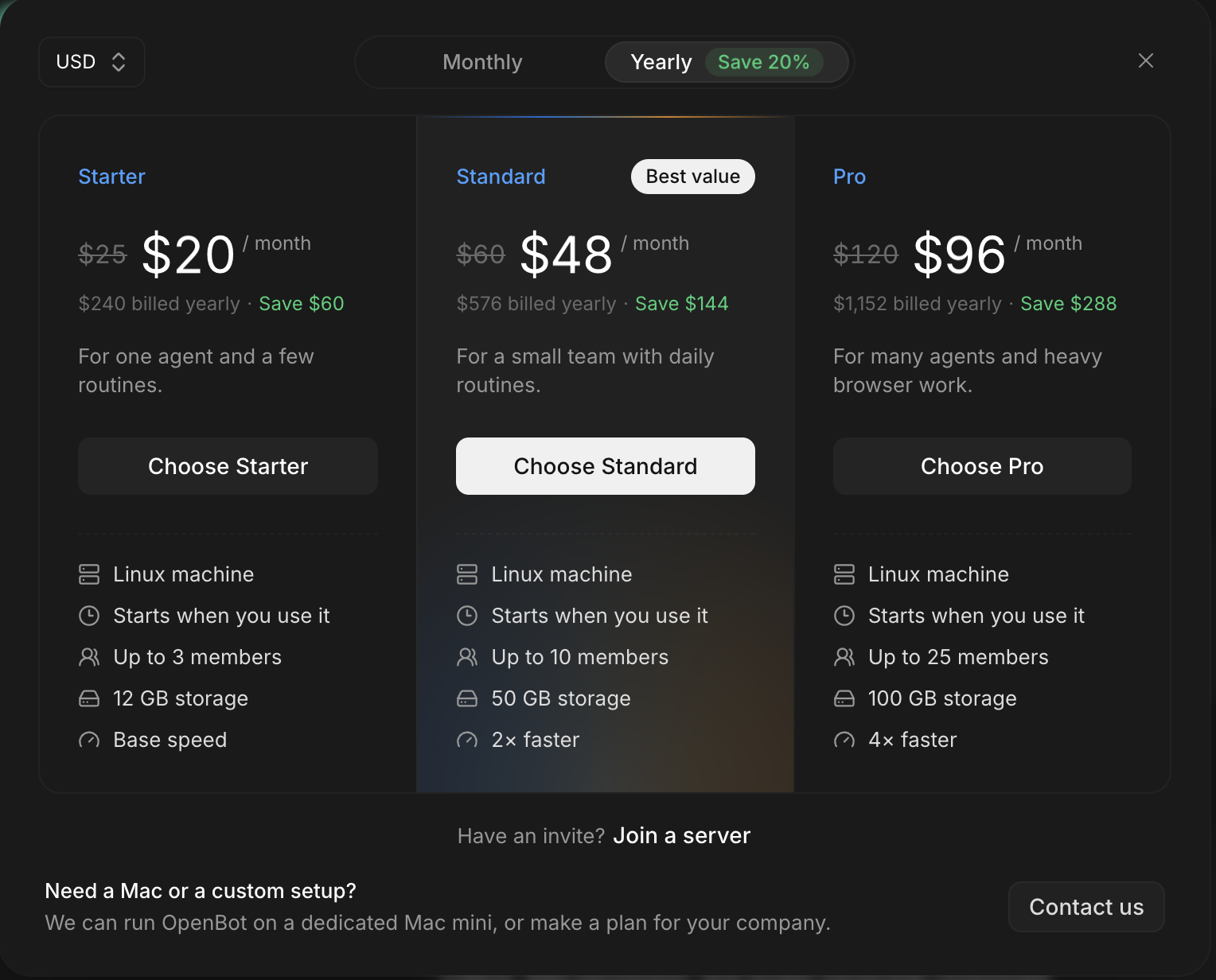
The plans differ mainly in how many team members can join, how much storage is available, and how quickly the server runs—not in the number of agents you can create.
Starter supports up to three team members, with 12 GB of storage and base speed. It could suit a small, founder-led company where two or three people share an OpenBot workspace for research, routine admin, or client work.
Standard supports up to 10 members, with 50 GB of storage and twice the speed of Starter. Think of a small software consultancy working across several client projects: its team might use agents for code review, research, and preparing project notes.
Pro supports up to 25 members, with 100 GB of storage and four times the base speed. It’s aimed at larger teams or heavier workloads, especially those involving more browser-based work.
You can pay monthly or yearly. The yearly option saves 20%.
Getting Started with a Hosted Server
Once you choose a plan and complete payment, OpenBot provisions a Linux server and connects it to your app. It then takes you straight to provider setup, so you don’t need to look for it in Server settings.
Connect an AI provider before creating your first agent. The server plan covers the machine OpenBot runs on; model access comes from the provider you connect. After that, you can set up agents for your team and invite teammates to join.
What Happens When You’re Not Using the Server?
A hosted server doesn’t need to stay active when nobody is using it. After a period of inactivity, it stops but keeps its data. It starts again when someone connects, and it can wake shortly before a scheduled routine so the routine runs at the right time.
If you connect Slack, the server stays awake while Slack is connected. That lets your team send requests to OpenBot in Slack and get responses from its agents. Without an active connection like this, the server goes idle when it’s not being used.
Hosted Server or Self-Hosting?
Many teams wonder whether to use an OpenBot hosted server or run one themselves. The main difference is who provides and looks after the machine. Here’s what to consider when choosing between the two.
With a hosted server, OpenBot provides the Linux machine, so your team doesn’t need to set up or maintain its own server computer. If you self-host, OpenBot runs on a machine you control. You have more control over the hardware, but keeping it available and maintaining it are up to you.
A hosted server suits teams that want to use OpenBot without looking after a machine. Self-hosting makes more sense if you already have suitable hardware and want to manage the setup yourself. See our guide to running the team server yourself for the self-hosting details.
In Short
If you want a team server without setting up and maintaining the machine yourself, an OpenBot hosted server handles that part. If you’d rather use hardware you control and manage the setup, self-hosting is another option.